🔌 Google Ads Now Prohibits Shared API Proxies and Hosted MCP Servers: How to Tell Whether Your Connector or AI Agent Is One, and What Stays Allowed
Google's new Developer Policies name MCP servers among banned programmatic proxies. Whose Cloud project carries your calls now decides what's allowed.
🚀 THE EXECUTIVE SUMMARY
The Definition: On 31 August Google renamed its Google Ads API Policy the Google Ads Developer Policies and added a prohibition on the "programmatic proxy": a "third-party hosted interface, secondary API, wrapper service, or MCP server, proxy endpoint, or any similar service that solely replicates, wraps, or re-exposes Google Ads programmatic capabilities as an intermediate layer". Per the Google Ads Developer Blog, "integrations now need to connect directly to Google Ads services using their own dedicated Google Cloud project."
The Core Insight: The question that decides whether a tool is allowed is no longer what it does. It is whose Google Cloud project and developer token carry its calls. The same open-source MCP server is permitted when you run it on your own credentials, and becomes the thing the policy names when someone hosts it for other businesses on theirs. No field in your reports tells you which of your tools is which.
What the policy now prohibits, in Google's words
The Developer Policies put it under Prohibited practices, Programmatic use. You cannot let agencies, advertisers or other third parties reach Google Ads "in a way that would allow those third parties to avoid applying for their own Google Ads developer access and Google Cloud Platform project". The examples are specific: developers "may not embed credentials in middleware that obfuscate the origin of the automated action, or operate shared developer proxy services that route automated requests from multiple independent businesses".
Writes get a harder line. End users "will need to manually sign in to make changes to their accounts", and headless programmatic account modifications "without Google review of the developer's proposed use case, or without direct, per-entity Google authentication" are prohibited. Read plainly, that sentence covers AI agents editing campaigns on a vendor's token.
Two carve-outs matter more than the ban. The policy "doesn't restrict your own use of the Google Ads API in a programmatic or automated way, nor does it restrict open-source tools where the end-users download the software and connect it to Google Ads using their own access credentials." And a vendor can ask for a Developer Secondary Interface Review, which asks for immutable logs mapping every automated action to a verified advertiser account and third-party security assessments such as SOC 2 Type II.
The compliance angle: a data flow you may not have signed
Google frames the change as security, naming "cross-tenant data leaks" and unaudited access through proxies. Read it with a GDPR lens and it is also a processor question. A hosted Google Ads endpoint sits between your account and your AI tool, holds a token that can read keywords, bids and performance data, and may serve many businesses from one project. The same policy already requires agencies to get written client consent before "disclosing or transferring data specific to their Google Ads accounts", and requires OAuth refresh tokens to be kept "encrypted at rest".
If you cannot say which project carries a tool's calls, you cannot say who processes the data, and your records of processing have a gap. That is fixable in an afternoon, and it is the artifact below.
Build or buy, now that the token is part of the answer
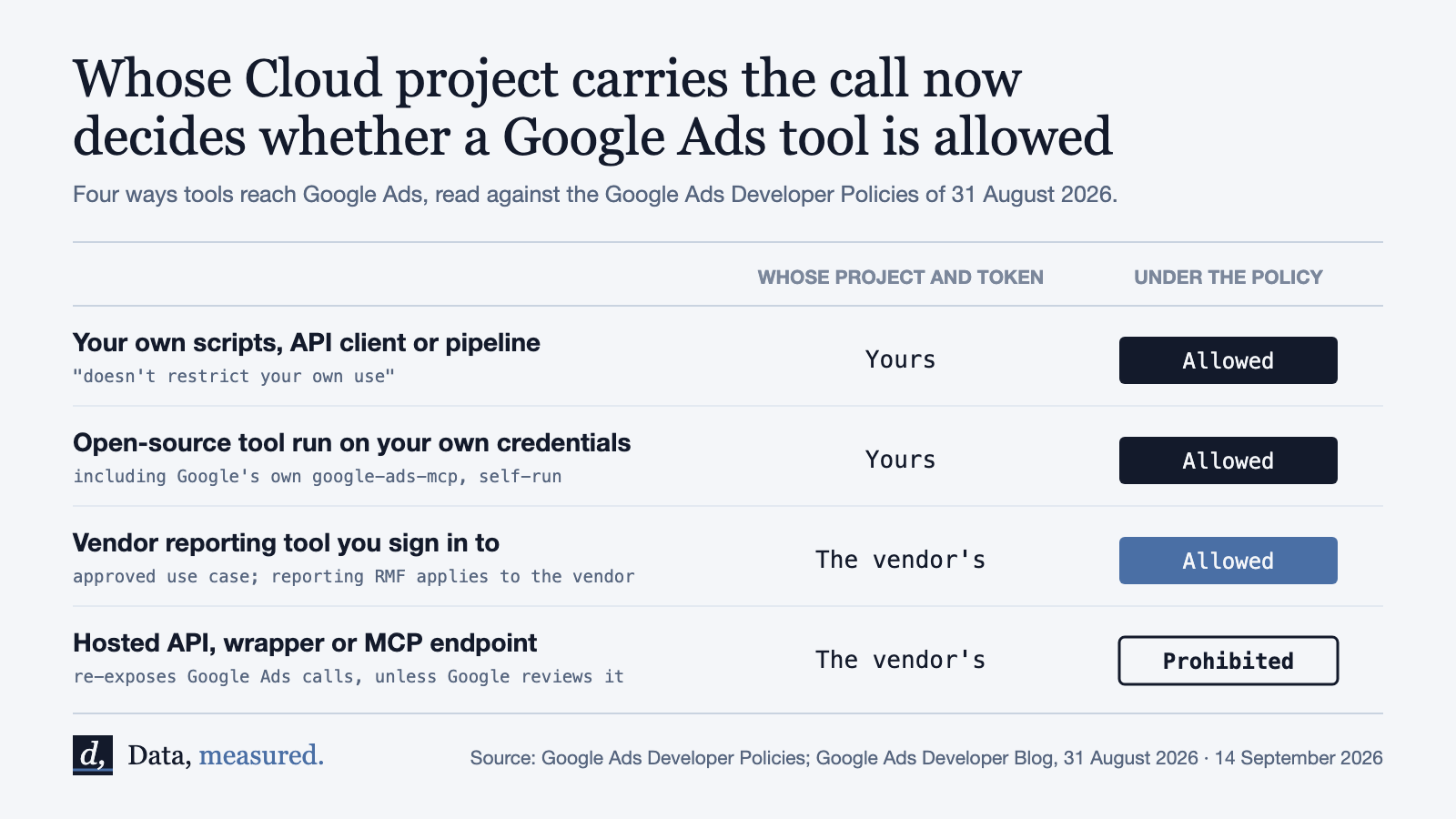
| Setup | Whose project and token | Under the policy | What you give up |
|---|---|---|---|
| Your own API client, scripts or warehouse pipeline | Yours | Allowed, own use | Engineering time; you apply for developer access |
| Open-source tool on your own credentials, such as Google's google-ads-mcp | Yours | Allowed, explicit carve-out | You host and secure it |
| Vendor reporting tool you sign in to | The vendor's | Approved use case; reporting obligations on the vendor | Control over which project holds your data |
| Hosted API, wrapper or MCP endpoint your agents call | The vendor's | Prohibited as a programmatic proxy unless reviewed | Continuity, once Google's compliance review reaches it |
For reporting, buying stays reasonable. For agents that act on accounts, the policy has made building the default: a developer token and a Cloud project of your own, with an open-source server on top if you want an MCP interface. Where Google's own server needs a developer token, it asks for at least Explorer access to query production accounts, so the application is the real cost, not the code.
The Expert Perspective
Two phrases carry the weight, and neither is tightly defined. "Solely replicates, wraps, or re-exposes" leaves room for a vendor to argue its endpoint adds analysis and is therefore not solely a wrapper. "Actively reviewing existing integrations" comes with no deadline, so the practical date is whenever the email arrives, from the google.com domain, to the contact address in your API Center. Violations can bring "non-compliance fees", downgraded access or termination.
The pattern is the one we traced in last week's issue on the language setting: a rule changes, and nothing in your data marks it. A hosted connector that is out of policy still returns rows until the day it is cut off. There is also a quieter date inside the same month: Google Ads API v22 sunsets on 7 October, when "all v22 API requests will begin to fail". Check both in one pass. The whole change is on this change on the log, with the checklist as the artifact, verified 14 September 2026.
Conclusion & Next Steps
- List every tool, script, connector and AI agent that reads or writes your Google Ads accounts.
- For each, get the vendor's answer in writing: which Google Cloud project and developer token carry the calls.
- Flag anything hosted that re-exposes Google Ads to you, and anything that can change an account without a per-entity Google sign-in.
- Move flagged agent workflows to your own developer token, or run google-ads-mcp on your own credentials.
- Update the contact email in the API Center, and check your Cloud Console metrics for v22 method names before 7 October.
FAQ
Is Google's own Google Ads MCP server allowed? Yes, when you download it and connect it with your own credentials; that is the open-source carve-out. Hosting it as a service for other businesses on your token is what the policy describes as a programmatic proxy.
Does this ban third-party reporting connectors? The policy names no vendors. Reporting and monitoring tools are an approved use case with their own obligations. What it targets is a hosted layer that re-exposes Google Ads programmatic access to businesses that should hold their own.
Is there a compliance deadline? None is published. Google says it is reviewing existing integrations and will contact developers who need to transition.
What if my agent only reads data? The definition of a programmatic proxy makes no exception for read-only access. The stricter sign-in rule applies to changes; the proxy prohibition is written about re-exposing capabilities, reads included.
References & Sources Cited
- Google Ads Developer Blog, Making Google Ads More Secure with Updates to Developer Policies (31 August 2026)
- Google Ads Developer Policies, Advertising Policies Help
- Google Ads Help, Programmatic proxy: Definition
- Google Ads Developer Blog, Google Ads API v22 sunset reminder (2 September 2026)
- googleads/google-ads-mcp on GitHub
- PPC Land, Google bans programmatic proxies from Ads API access
Forwarded this by a friend? Subscribe here. Found it useful? Forward it to one person who'd want it.
See you soon, Team Data Measured